


We spent the spring talking to issuers across higher ed, associations, awarding bodies, and software certification programs about the credential lifecycle. Two questions kept producing a pause.
When do you stop standing behind a credential? And when a credential stops being true, what should happen to it?
Not the policy. The policy almost always exists. For accredited bodies, it has to. The international standard for certification bodies requires a documented procedure for suspending and withdrawing certification.
The question was narrower and more practical: in the system where the credential lives, where it gets verified, where the learner manages it, what happens, and does it depend on why?
Because the reasons aren't alike. Someone's membership lapses because they didn't pay. Someone fails to complete their continuing education. Someone's conduct goes before an ethics committee. Someone recertifies, and their standing continues uninterrupted. Someone was never eligible in the first place. A version of the product the credential certifies no longer exists.
Those produce different obligations. Lapsed membership is reversible and probably routine. An ethics finding needs to be defensible years later. Ineligibility might warrant erasure. A product version retiring isn't a failure by the holder at all, and treating it like one would be unfair to them.
The actions available are also different from each other. Expire, withdraw, delete, reissue, do nothing. Each says something distinct to the holder and to whoever checks the credential next.
What we found is that a lot of programs haven't thought through the market-facing view of their credentials' status.
These are rigorous programs. Status has been treated as bookkeeping rather than as something a program decides on — a mapping that was never drawn because nobody framed it as a decision. Or as a public statement.
Status Is the Only Part of a Credential Written in the Present Tense
Everything else on a credential is historical. The issue date, the criteria, the evidence, the name of the person who earned it. All of it describes something that happened.
Status is the only field making a claim about now. Active says this person is in good standing today. Expired says they were, and aren't. Revoked says something stronger — not that time ran out, but that we took this back.
What they have in common is that they can all change. A credential whose status you still maintain is one you're still standing behind. Stop maintaining it, and the credential will keep making claims on your behalf anyway, long after you've stopped checking whether they're true.
Which makes it odd that most programs set status once and never return to it. The most active part of the credential is managed as the most passive.
A credential's status isn't a record of what happened to it. It's what the credential is claiming about someone right now.
The Answer Isn't More Statuses
The argument above could lead somewhere I don't think is right, so I'll say it plainly.
Every status a program invents is one a verifier has to interpret. The vocabulary already exists, and it's shared across the open standards and certification bodies alike. Words that feel more precise about your situation are usually less legible to everyone outside it.
The discipline is deciding which of your reasons map onto which of those few states, and being consistent about it. More reasons than actions are normal. Several reasons landing on the same action are fine. Not having decided is the problem.
Five Questions Worth Asking About Your Own Program
What is your credential saying about you? Every status is your organization making a statement about someone, in public, without you in the room. Active means you vouch for them today. Revoked means you took that back, and you'll stand behind the decision. Expired means something has lapsed, and you've chosen not to say more than that. If you haven't decided what each one means, the credential is still saying it.
Does each reason a credential's status changes have its own answer? If every cause resolves to the same action, the credential can't distinguish between a lapsed renewal and a revoked certification. Neither can anyone looking at it.
When a holder recertifies, do they end up with one credential or two? Both are defensible. One record keeps their history continuous and keeps the link they already shared pointing somewhere current. Two gives you a discrete artifact per cycle, which some programs need for audit or for versioned certifications. What matters is whether you picked, and whether your counts mean what you think they mean either way.
Who asks you about this, and what do you tell them? In our 2026 State of Credentialing report, 55% of issuers said pressure to demonstrate the value of their program has increased, and the stakeholders doing the asking aren't one audience — leadership, boards, learners, employers, funders, each wanting something different. Most of what you'd tell them starts with how many credentials are currently valid. Not issued. Valid. Most programs can produce the issued number instantly and only estimate the valid one.
What does a viewer see when standing lapses? Someone checking a credential has one question, and it isn't whether it was earned. It's whether it still stands. Whatever your credential page says in that moment is your program speaking.

Where We've Landed
At Accredible, every status change on a credential is kept as a dated entry rather than replacing the one before it, so a credential carries its own sequence as well as its current state. Revoking a credential stops it from being verified and stays on the record. Reinstating restores it without reissuing. Expiring tells anyone checking that the credential is no longer valid, and when it stopped being valid. Renewing extends the credential someone already holds, so one person stays one record across cycles. Deleting is there for the cases that call for erasure.
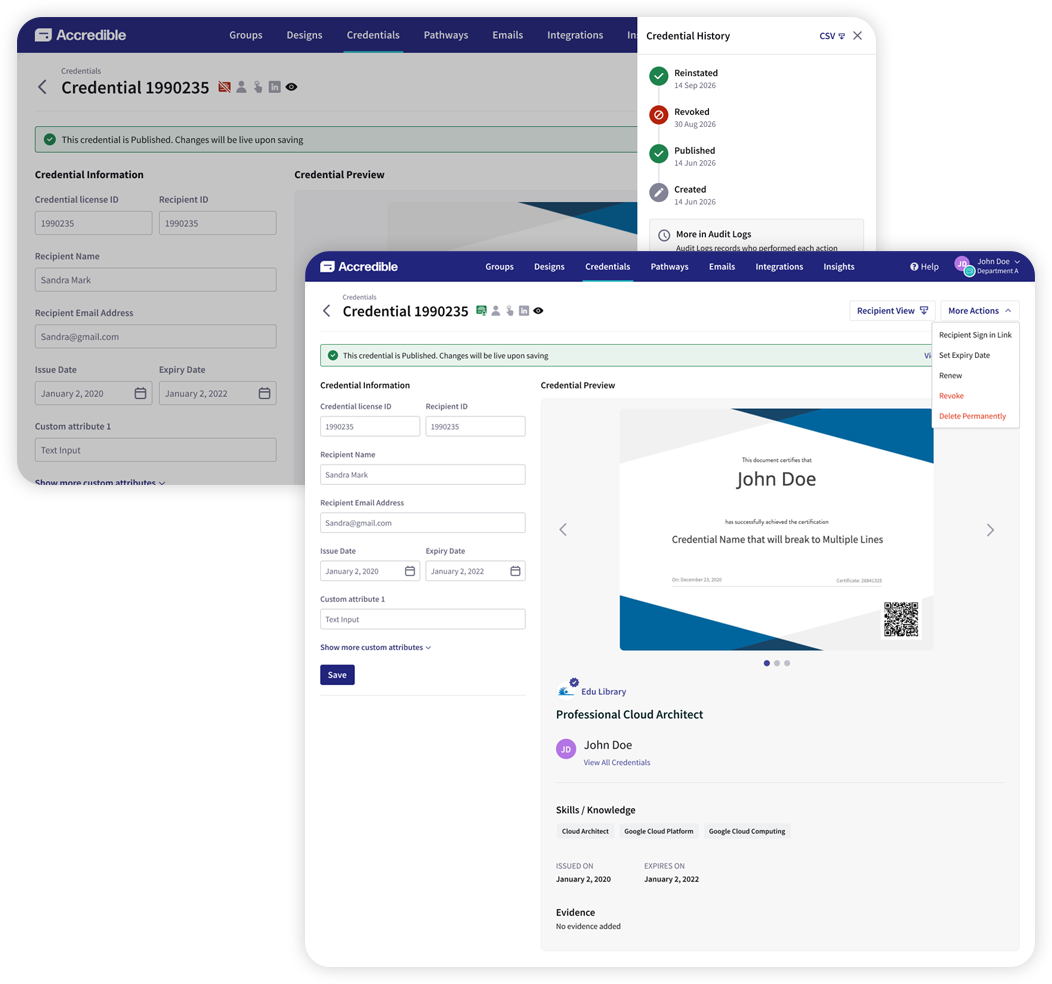
It's included for every customer at no charge, because core lifecycle shouldn't be a premium capability.
None of that answers the five questions for you. Those are yours, and they're worth working through, whatever platform you're on.
So: the exercise. List every reason a credential in your program might stop being true. Put the action beside each one and the thing a verifier would see. Most programs find a few rows they've never decided, and at least one where the current default is doing something they wouldn't defend out loud.
It'll probably take you less than an afternoon, and you'll know what your credentials are saying.
If you'd like our team's help with the exercise, request a demo. Already a customer? Your CSM can walk you through it.
See It in Action
Here's how revoking, reinstating, and renewing a credential work in Accredible, and where each change shows up in a credential's history.


