


One group launches a business certification. Another builds a specialty learning pathway for AI in finance. A corporate partnerships team runs a third. Each answers to different people and moves at a different speed. That's what growth looks like up close.
The share of people personally involved in developing credential programs rose from 50% to 60% between 2021 and 2025 (UPCEA). More hands, spread wider.
The programs are already operating independently. The harder question is how you let them do that without ending up with three separate digital badging platform accounts, access that nobody's tracking, or yourself as the administrator of every area in the organization.
Access tends to get filed under administration as something to sort out later.
The cost was never the permission. It's the hesitation before the next program launches.
The Request You've Probably Had
Someone in another part of the organization wants access. They want to run their program without routing every change through you.
To be fair, you'd rather not be in the middle of every change either.
Most digital credentialing platforms leave you with three options. Give them the run of the entire organization, keep them waiting on you, or give them a wholly separate account, possibly at extra cost, still somehow governed under your umbrella.
None of them is the answer you wanted to give: here's your program, and nothing beyond it.
Departments Are Boundaries. Access Should Stop at Them.
When two teams don't share an audience, a budget, or a timeline, they shouldn't have to share access either. Accredible departments have separated programs, branding, and settings inside a single account for years.
At Databricks, which has issued more than 1 million credentials on Accredible, Rachel Canetta, Senior Manager of Certification, set up a department for each team that wanted its own badges, from partner enablement to developer relations to University Alliance. Each builds within the governance framework she owns, without touching anyone else's work. "I don't want them messing with my departments," she says. "So I can kind of keep them separate."
The Department Admin, Developer, and Organization Admin roles extend that separation to who is allowed to act.
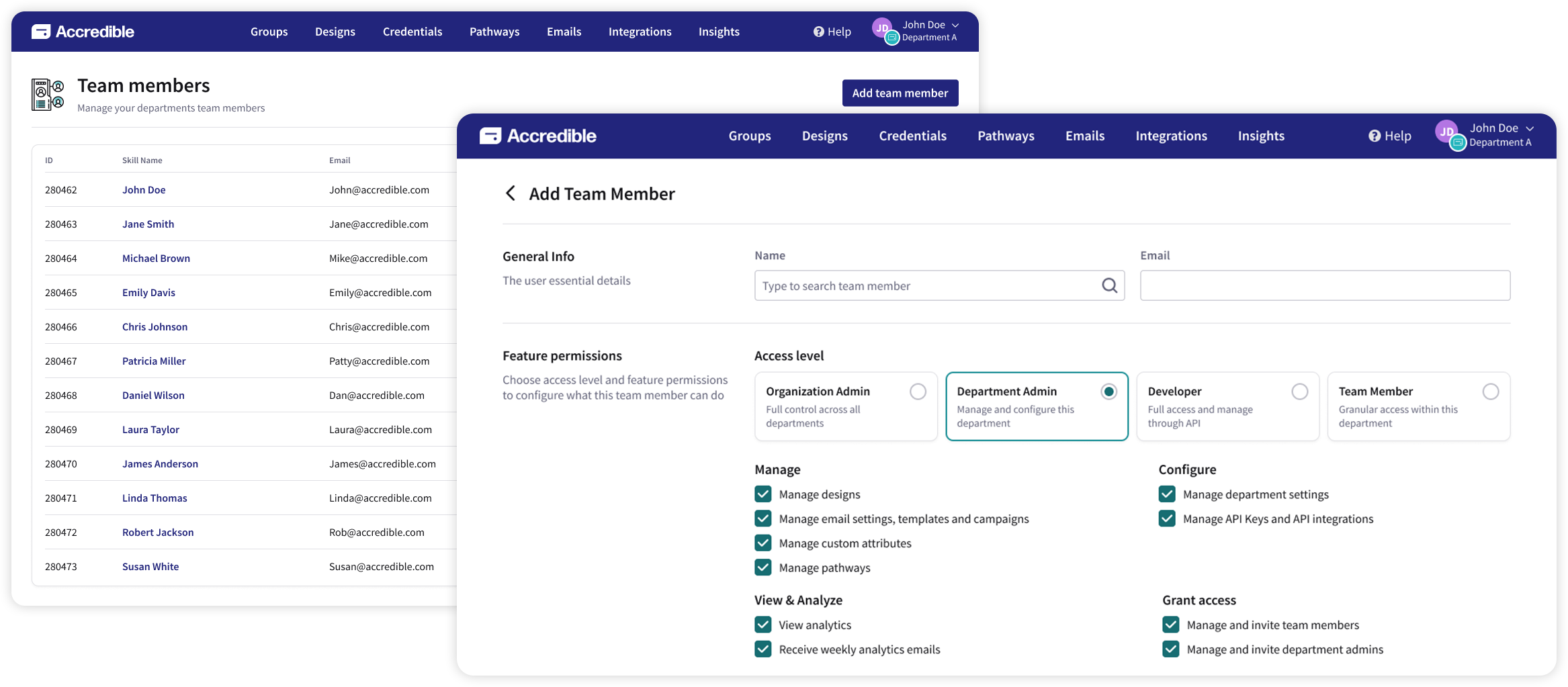
Department leads, as Department Admins, manage what sits inside their department: their programs, their people, their reporting. Their reach stops at the boundary, in the dashboard, in the API, and in bulk operations alike. They can even get their own weekly analytics email instead of waiting for someone to forward it.
Your tech team sets up the integrations they need without anyone being made an administrator of the whole organization. The Developer role gives them full API access for a department and no ability to change anything in the interface.
.webp)
Organization Admins keep full visibility and control across every department. When someone asks who has access to what, one view answers it, filterable by department, access level, and person. Every role and permission change is logged too, so when compliance asks who changed what and when, the answer is already there.
All of it happens inside one account. Other platforms that offer scoped access get there by splitting an organization into separate issuer accounts, which means separate or manual reporting, separate setup, and separate management for every part of the organization.
It Reads Like an Operations Problem. It Behaves Like a Growth Problem.
Every part of the organization you add compounds the access question. Add a region, a brand, or a new program area, and you add either another person who can reach everything, or another request routed through whoever already can. Do that four or five times and the model stops being an inconvenience and starts being a reason to say “not right now.”
Programs that grow, grow outward. Scoped access is what lets the next group start without the organization giving anything up to do it.
If you already run departments in Accredible, start on your team members page. Look at who holds full administrative access and ask how many of them need it. None of this requires preparation. Existing administrators keep exactly the access they have, and you reclassify people at your own pace, one at a time, or not at all.
If you're evaluating Accredible for an organization with more than one department, talk to our team about giving each one the access it needs without handing anyone the keys to the whole organization.


