


Every time a learner shares a credential, someone sees it. The brand they see shapes their first impression of the program that issued it.
If your credentials live on a third-party platform’s URL, carry that platform’s logo, and arrive in your learners’ inboxes from an address they don’t recognize, the brand doing the work isn’t yours. Every share, every employer click-through, every LinkedIn view builds recognition for the platform vendor, not for the organization that built the program.
That is the problem white-label branded digital credentials exist to solve. White-label digital credentials are digital certificates and badges issued through a dedicated credentialing platform under the branding of your organization. This article explains what the customization actually covers at each level, why it connects directly to sharing rates and program growth, and how to evaluate whether a platform’s white-labeling claim holds up.
What does white-label digital credentialing actually mean?
White-label digital credentialing means the credential experience looks and feels like it came from your organization, not from the platform that issued it. That covers the page, the URL, the email, and the learner wallet.
In practice, it breaks down into four distinct elements:
- The credential URL. Does it live on your domain (for example, credentials.yourorganization.com) or your badging vendor’s?
- The credential page. Does the learner land on a page that matches your website (i.e., your colors, fonts, headers and footers, and navigation), or a generic platform interface?
- The email notification. Does it arrive from your sending address or your badging vendor’s?
- The learner wallet. When a learner views all their credentials in one place, does that page carry your branding or the badging platform’s?
The gap between covering some of these and covering all of them is wider than most buyers realize during an initial evaluation. Most digital badging platforms that advertise branding and white-labeling deliver the first item on that list — logo removal — and stop there. The deeper capabilities vary significantly from vendor to vendor, and often from plan to plan within the same vendor.
Why does brand control matter for credential program growth?
A credential that earns recognition for someone else’s brand is not a growth asset for your program. When a learner shares on LinkedIn and their connection clicks through to a platform-branded page, every employer, peer, and prospective learner who sees it learns the platform’s name rather than yours.
The brand ownership argument runs all the way through the credential’s lifecycle:
- The initial email sets the tone. A recognizable sender address and a branded template signals that the credentials come from a trusted credential organization — not from a tool they've never heard of.
- The credential page is often the first touchpoint a third party has with your program. If it doesn't look like you, it doesn’t build trust in you. For employers checking a candidate's credentials, that page is your program's first impression.
- The shareable URL is a permanent marketing channel. A branded subdomain means every view, every verification, and every employer check reinforces your domain authority rather than the platform’s. When your custom header and navigation are on that page, every person who lands there is already inside your ecosystem — one click from your course catalog, your membership page, your events.
What can you actually control with white-label digital credentials?
To find the right white-label digital credentialing service, start by identifying the level of control your program needs. Ask:
- Do you need to add your logo to the credential page?
- Do you need your logo within the email header?
- Do you need full control over email branding, including header, footer, and internal links?
- Do you need to style the credential page in line with your own website?
- Do you need credentials hosted on your own domain?
- Do you need your full website header and footer — with your links and navigation — on the credential page?
- Do you need consistent branding throughout to provide a sense of security or professionalism to recipients?
Accredible organizes branding control across three tiers. The table below shows exactly what each includes:
Baseline Settings: Available on all plans
Every Accredible customer can customize their certificate and badge designs, configure email appearance (colors and fonts), set their issuer logo and banner image, and set up a custom SMTP to send credential notifications from their own email domain. These are the foundations and ensure the credential looks like it came from your organization before you add any further branding layers.
See it:
- University of Sydney
- Delaware Restaurant Association
- Institutional Compliance Solutions (ICS)
- Cybervance
Branding Package: Launch (add-on) and Connect
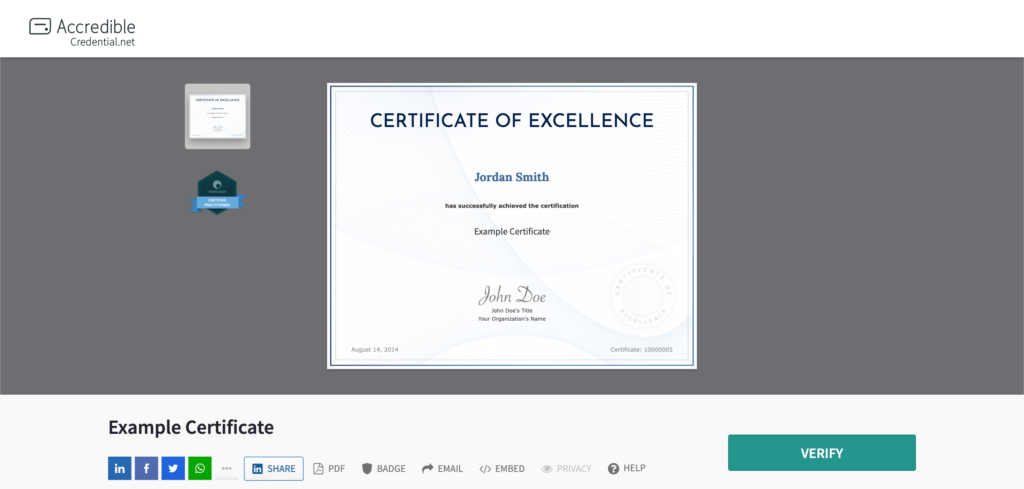
The Branding Package adds a custom CNAME domain so credentials are served from your subdomain rather than Accredible’s. It removes all Accredible vendor branding from the credential view and email templates and gives you control over email footer content. This is what most platforms in the market mean when they say white-labeling (more on this later).
See it:
Premium White-labeling: Connect (add-on) and Growth
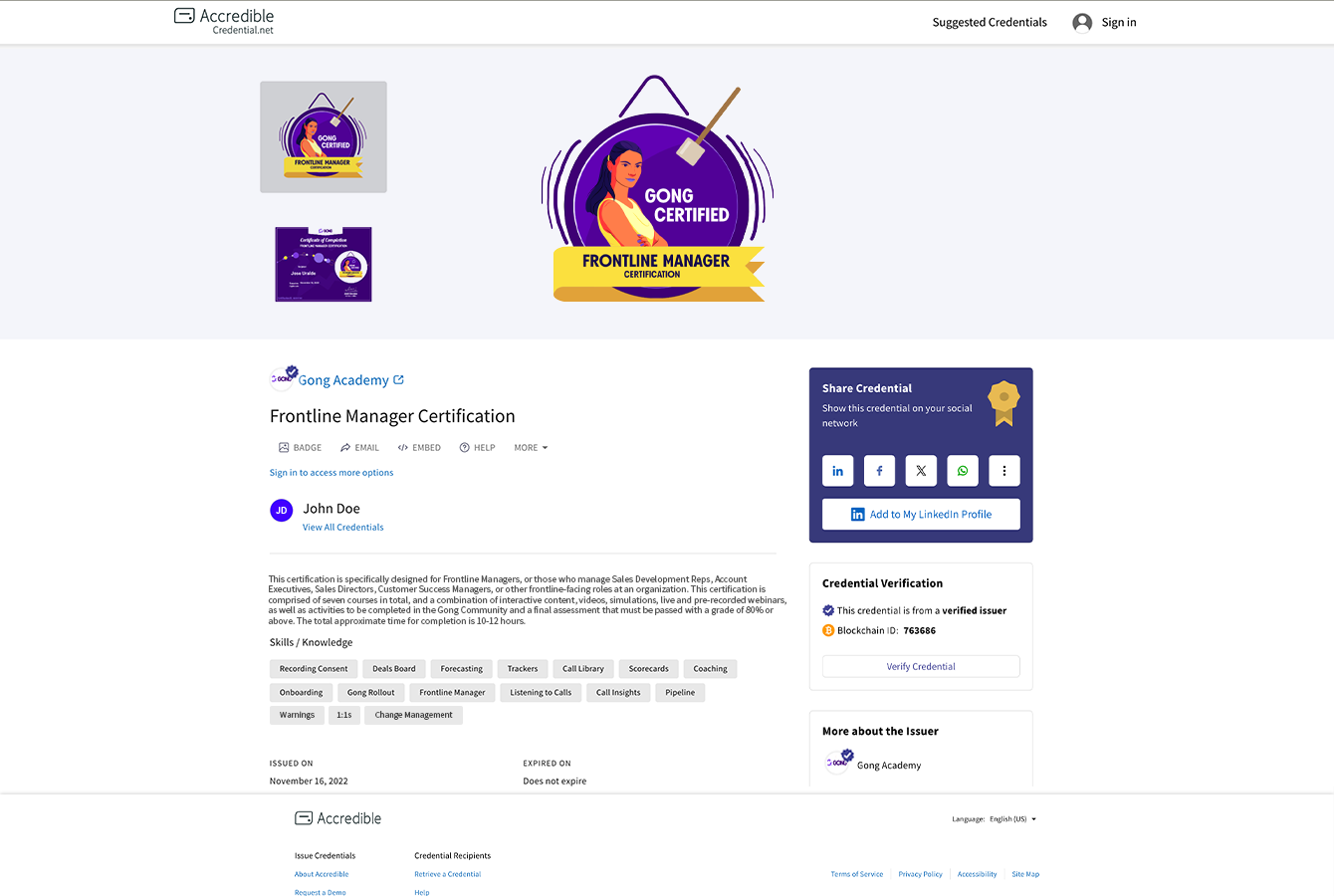
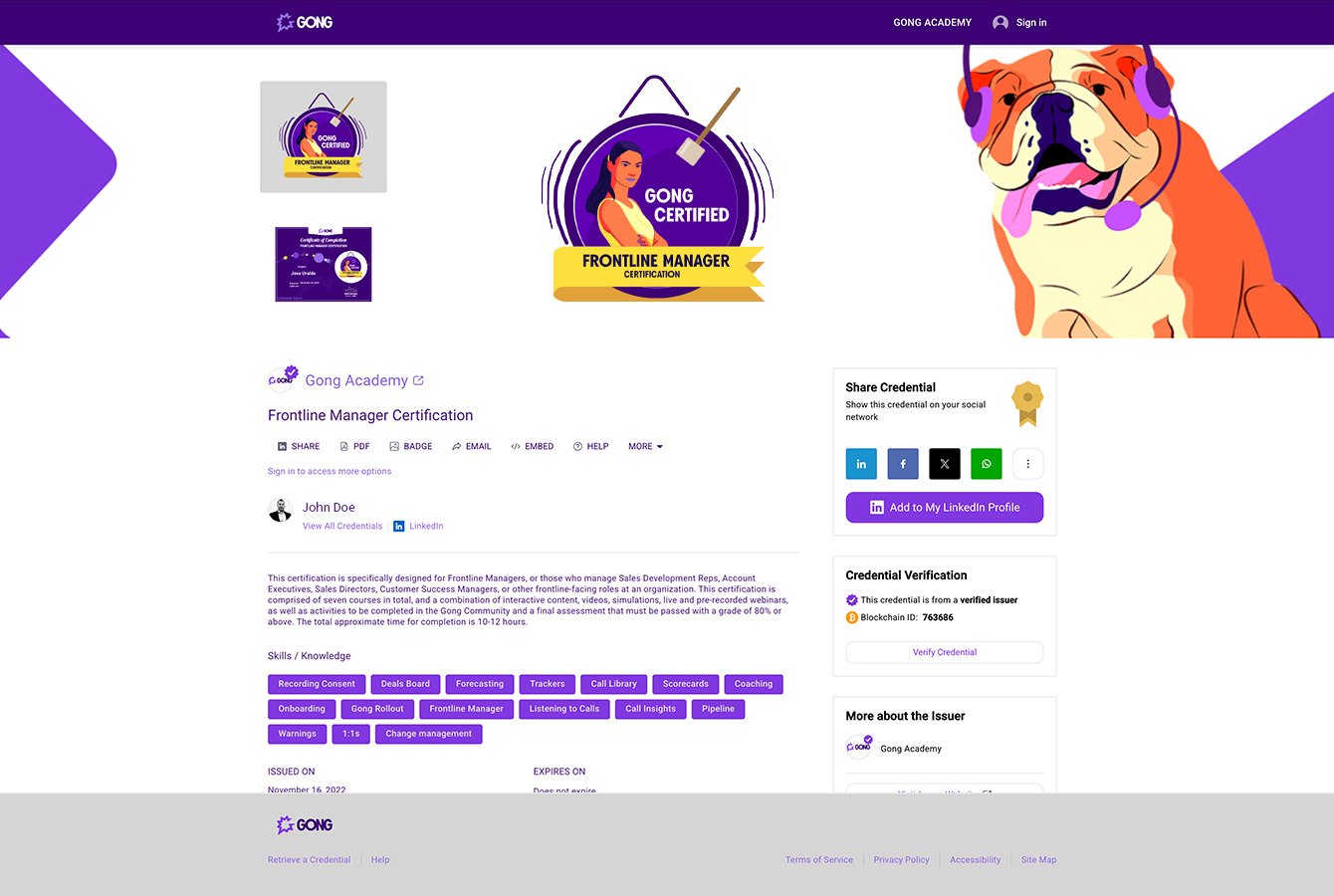
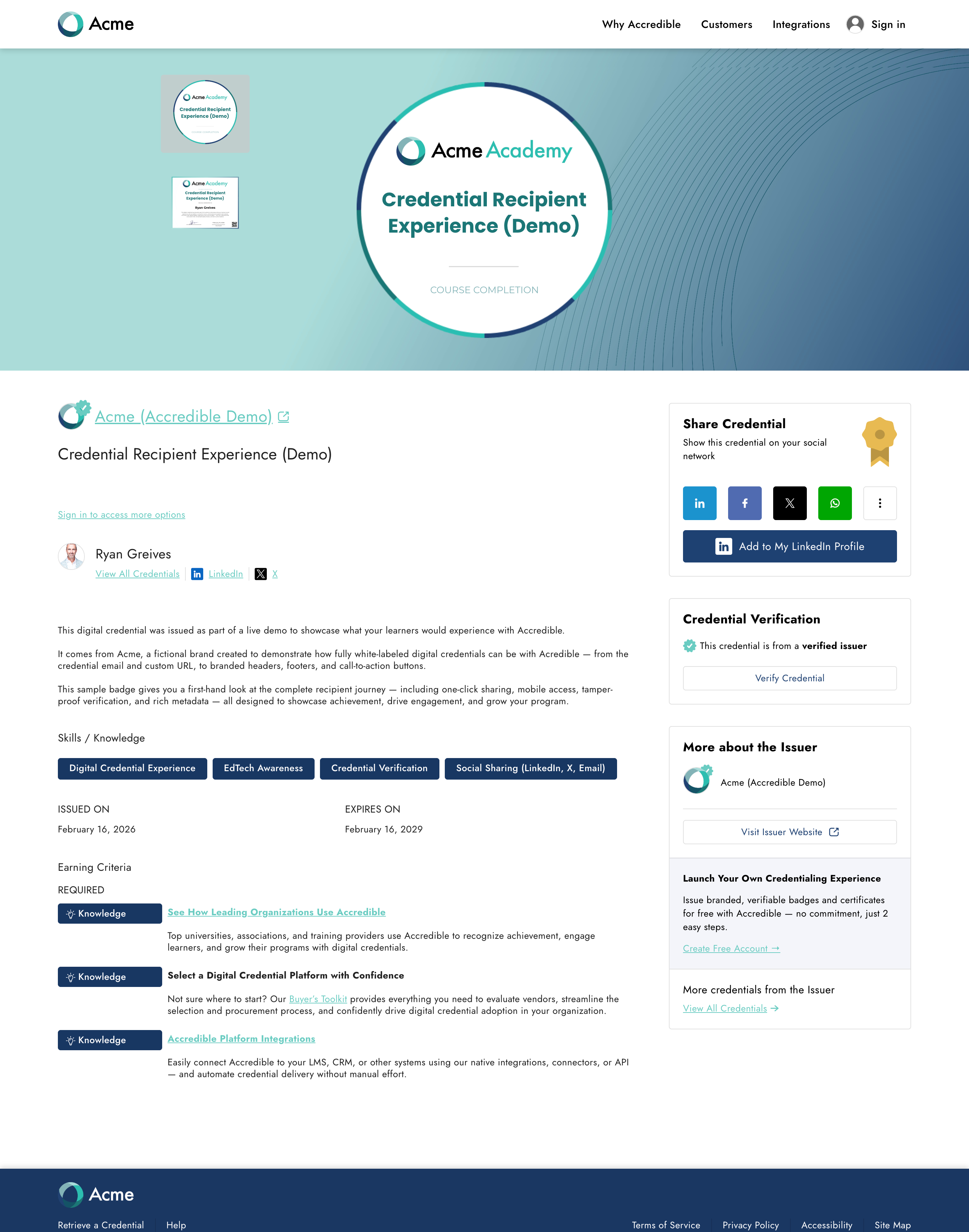
Premium White-labeling is full site-level control. On top of everything in the Branding Package, you get full CSS theming (colors, icons, element styling), custom fonts, and a custom HTML header and footer so the credential page navigation and links match your website exactly. You also get a white-labeled wallet view so learners’ credential collections are hosted on your domain, and the option for independent branding at the department level. No other platform in the market offers this level of control.
See it:
- Gong
- Toast
- Syracuse University
- Databricks
- Junior Achievement USA
- American Board of Internal Medicine
- American Chemical Society
- Snowflake
- Wharton Online
Unlike the Branding Package, Premium White-labeling is set up by Accredible's team — you share your brand guidelines, and we build it.
One important nuance: account management pages (login and account settings) remain on Accredible’s domain. A learner’s account may hold credentials from many organizations, so no single issuer’s branding can govern that shared experience. The same applies to multi-issuer features like digital credential transcripts and verified career records. This is standard across the industry, and the reason is straightforward: those pages belong to the learner, not the issuer. For organizations where learners sign in frequently, SSO integration sidesteps this entirely — learners skip the Accredible login page and go straight into the experience.
What "white-labeling" means on most platforms — and why it matters
Before evaluating any platform's white-labeling claim, it helps to understand what that term usually means in the market versus what it means at Accredible.
When most competitors say "white-labeling" — including some that advertise "100% white-labeling" — what they typically mean is logo removal. The platform's logo no longer appears; your logo replaces it. Sometimes that includes a custom domain. Sometimes it includes limited email customization. In rare cases, a competitor might let you add custom images or change a button color.
What they almost never offer is what Accredible calls Premium White-labeling: full CSS control over colors, fonts, and layout; a custom HTML header and footer built to match your actual website; and a white-labeled wallet view. The distinction isn't minor. Logo removal produces a credential page that looks like the platform — with your logo on it. Full CSS and HTML control produces a credential page that looks like your website. Those are different products, even when they're described with the same word.
In an internal review of 10+ competitors across plan tiers, Accredible's Premium White-labeling was the only offering that supports custom code control over the full site look and feel. Every other competitor's top white-labeling tier is roughly equivalent to Accredible's Branding Package.
When you're evaluating platforms, the right question isn't "do they offer white-labeling?" It's "what does their credential page look like for a customer using their highest branding tier — and does it look like the customer's site, or does it look like the platform?"
How does white-labeling connect to credential sharing and program growth?
Brand control and sharing rates are directly connected, and the mechanism is often misunderstood. The connection isn’t just aesthetic‚ it’s structural.
When a credential lives on your branded domain, the URL learners share is yours. When an employer or peer clicks through, they land on your page. The SEO value of that traffic accrues to your domain — not your platform’s. And for organizations that want to track that behavior, Google Tag Manager integration on a white-labeled credential page lets you treat those pages like any other page on your site — seeing views, sessions, and click-throughs natively in your analytics.
The evidence is clear in organizations that have rebuilt their credential experience around brand control.
The Maker Group, a sales training provider whose clients include Kellanova, General Mills, and Nestlé, switched away from a platform that required account creation and carried its own branding in the credential experience. After moving to Accredible’s fully branded, friction-free approach, credential open rates increased 68% year-over-year, and LinkedIn credential share rates climbed 29%. Their clients began asking who the credentialing vendor was so that they could use Accredible themselves. That share-rate lift lines up with what we see across Accredible customers more broadly: branded credentials average 65% higher sharing than non-branded ones. Our guide to increasing credential sharing breaks down branding alongside the other levers that move that number.
Paul Voisard, a Partner at The Maker Group, said, "What initially sold us on Accredible was the white-labeling option unavailable through Credly. When we send a credential, it looks the same as our other resources and is in a familiar place. It's little things like this that uplevel the end user's experience and ultimately drive greater retention, engagement, and sharing."
Asana had a similar experience when building its product certification program. The team chose Accredible in part because of the white-labeling capability and the need for credentials to feel native to their learning ecosystem — not like a separate tool learners had to find their way to.
JJ Janikis, Head of Customer Education at Asana, shared, “Accredible’s ability to white-label really stood out. “The custom branding, credential landing page, navigation, and domain made our credentials feel native to our learning ecosystem.”
Asana issued 74,000+ credentials in year one with a 91% credential share rate.
For associations, the growth mechanism is the same, but the stakes are higher. Every credential share is a potential membership touchpoint — someone sees a Six Sigma Black Belt credential on LinkedIn, clicks through, and lands on a page that looks and feels like the association's own site. Your full navigation is right there: membership, certification pathways, events, publications. You don't need to hope they find their way back. The credential brought them there.
The Institute of Industrial and Systems Engineers (IISE), a professional society with over 23,000 members, saw this play out directly. After moving to Accredible, their credential share rate increased 96%, and their LinkedIn share rate jumped 123%.
As James Swisher, Director of Continuing Education for IISE, noted, "I think all of us at IISE underestimated the additional exposure Accredible's credentials would give the Institute on social media. It helps other folks understand what kind of programs we offer and gets them thinking about a membership."
Is the learner wallet white-labeled too?
This is one of the most common questions in platform evaluations, and the answer depends on which tier you’re on.
With Accredible’s Premium White-labeling, the branded wallet lives on your subdomain (for example, credentials.yourorganization.com/proflle/user/wallet). When an employer or colleague clicks through from a learner’s profile to explore their full credential record, they land on a page that looks and feels like your organization’s. Issuers can also control which credentials appear in the branded wallet — so if you're Google Cloud, you're not showing AWS credentials alongside yours.
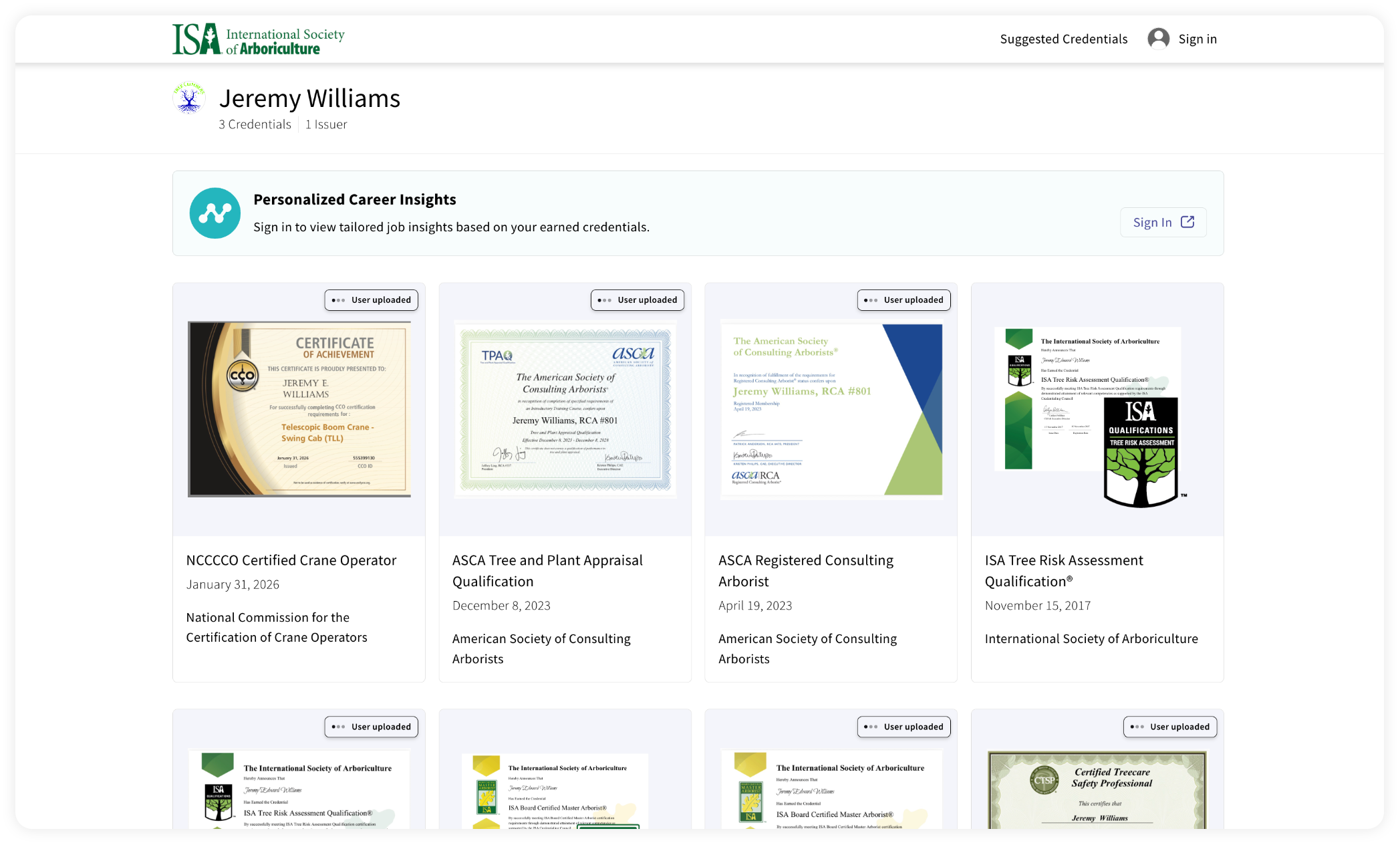
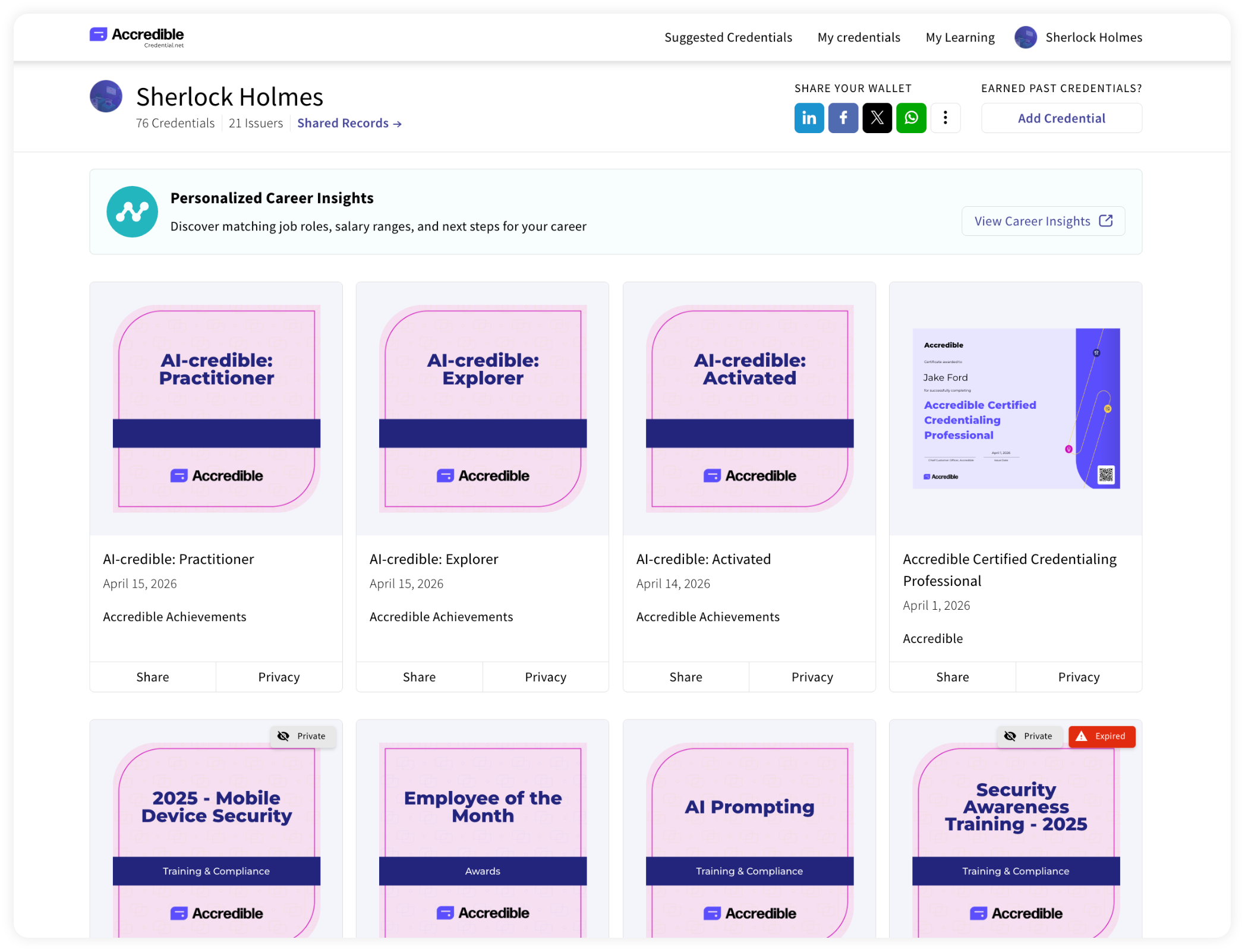
An unbranded wallet also exists alongside the branded one. It’s the multi-issuer view that aggregates credentials from all organizations a learner has worked with, and it sits on Accredible's domain — as it must, since no single issuer's branding can govern a page that holds another issuer's credentials.
How does Accredible support white-label digital credentialing?
Across all three credential branding tiers, Accredible offers the most complete white-labeling package in the digital credential market — and the gap between what we offer at the Premium tier and what any competitor offers is significant. The tier table above covers what's included at each level. The question worth asking is whether Premium is right for your program.
The organizations that get the most from Premium White-labeling tend to share a few traits: brand control has come up internally as a concern (stakeholders noticed the platform logo on credentials), they need credentials to feel native to an existing digital ecosystem, or they're running programs where the credential page is a meaningful touchpoint with employers, members, or customers.
Amanda Brantner, Senior Director of Content and Educational Portfolio Strategy, Gies Business at the University of Illinois, shared, "Our certificates and badges needed to feel like an extension of our institution, not like they came from another third-party tool. With Accredible's white-labeling capabilities, we could create credentials that are ours."
Tanya Austin, Professional Learning & Micro-Credentials Program Specialist III, Iowa State University, echoed that sentiment: "It had to feel like Iowa State — not a third-party tool. Accredible lets us keep our design standards and institutional branding, while adding all the metadata that makes our credentials meaningful. When an employer sees our badges, they know it's a verified, high-quality microcredential."
White-label credentials and the Accredible network
White-labeled credentials don’t just protect your brand. They also benefit from the network Accredible has built around credential discovery.
Issuers using Accredible’s CourseFinder and Recommendations products get their programs in front of learners searching for credentials in their field. CourseFinder surfaces your credentials to prospective candidates at the moment of intent. Recommendations advertises related credentials directly on a learner’s credential page, increasing re-enrollment and pathway progression without additional marketing effort.
This is particularly effective for issuers using white-label credentials. Every new learner who discovers your program through the network arrives at a credential page that looks and feels like yours from the first click.
The Accredible Directory Network extends this visibility further. Every public Spotlight Directory is automatically included in the network — a publicly accessible hub where employers, learners, and partners can explore verified credential directories across the Accredible ecosystem, filtered by industry, location, or credential type. According to the 2025 State of Credentialing, 91% of employers look for digital credentials when reviewing candidates, and 75% want access to credentialed directories. The network puts your white-labeled program directly in front of that audience, with no additional configuration required.
Your directory stays fully branded and fully controlled. The only change is broader reach.
The bottom line
White-label digital credentials are not a cosmetic upgrade. They determine whether your program builds its own brand with every share or quietly builds someone else’s.
The credential page a learner lands on, the URL they share, the email they receive, the wallet they show an employer: every one of those touchpoints is a brand decision. If the credentialing platform owns any of them, part of your program’s identity goes to the vendor.
Accredible’s three-tier branding architecture is built around the belief that issuer control is not a preference — it’s a prerequisite. The credential experience should look, feel, and perform like yours.
Compare Accredible’s branding options and plans
Frequently asked questions
Does white-label digital credentialing mean the platform logo is removed?
That’s part of it, but true white-labeling goes further. Logo removal is just the starting point.. Full white-labeling adds a custom domain so credentials live on your URL, a custom email send domain, full CSS control over colors, fonts, and layout, and a white-labeled wallet view. Accredible’s Premium White-labeling includes all of this.
What's the difference between the Branding Package and Premium White-labeling?
The Branding Package removes Accredible's vendor branding and puts your credentials on a custom domain — your logo, your URL, your email footer. The credential page still looks like Accredible's standard interface, with your branding applied. Premium White-labeling goes further: full CSS theming means the colors, fonts, and button styles match your website; a custom HTML header and footer means your site navigation is on the credential page; and the branded wallet is hosted on your subdomain. The result is a credential page that looks and feels like your website built it.
Can I host credentials on my own domain with Accredible?
Yes, Accredible sets up a CNAME so credentials are served from a subdomain you control (for example credentials.yourorganization.com). Every shared credential, every employer verification, and every LinkedIn click-through reinforces your brand rather than ours.
Does white-labeling affect how credentials are shared on LinkedIn?
No. Learners can still share with one click to LinkedIn and 40+ platforms. The difference is that the credential URL and the page they land on reflects your brand entirely. Employers clicking through from LinkedIn land on your domain rather than a third-party platform interface.
Is white-labeling available on all Accredible plans?
Baseline brand settings (certificate design, email appearance, issuer logo) are available on all plans. The Branding Package (custom domain, vendor branding removal, email footer control) is available as an add-on on Connect and Launch plans. Premium White-labeling (full CSS, custom fonts, custom HTML header and footer, white-labeled wallet view) is available on Growth and Connect plans.
Can I use Accredible’s white-labeling with my existing LMS?
Yes. Accredible integrates natively with Canvas, Moodle, Brightspace, LearnUpon, Docebo, and 40+ other platforms. Your LMS handles course delivery, and Accredible handles the branded credential experience.
Is Premium White-labeling self-serve?
No — and that's a feature, not a limitation. Premium White-labeling is set up by Accredible's implementation team. You share your brand guidelines and give feedback on the mock-up. Accredible builds it.
What can't be white-labeled?
Account management pages (login and account settings) remain on Accredible's domain, because a learner's account can hold credentials from many different organizations. No single issuer's branding can govern a shared login experience. The same applies to multi-issuer features like transcripts and CLRs. Standardized credential terms like "Expired" or "Revoked" also can't be changed, because those terms have a defined meaning in the credentialing ecosystem. These are the limits of any credentialing platform — not specific to Accredible.


